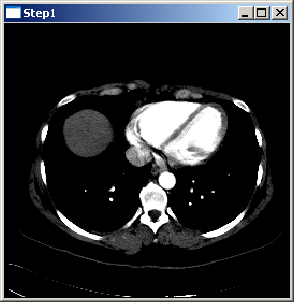
Open your IDE. All steps can be found among the listed projects. The first program shows how to display an image in a 2D view. The picture above is a screenshot of the program. The program has to be executed using the image file Pic3D.nrrd.
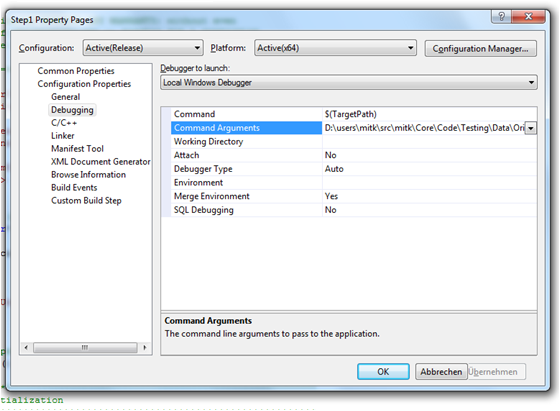
If you are using Visual Studio start MITK.sln in your bin\ subdirectory to start it with all required paths set. To set the image file path in Visual Studio, right click on "MitkStep1"-project and go to 'Properties -> Configuration Properties -> Debugging'. Now insert the image file path to Pic3D.nrrd in the "Command Arguments" text field. Then right click on the "MitkStep1"-project again and select "Set as StartUp Project". Start to run the code. Use this also in the following steps.
The code is divided into parts I through V. First of all a DataTree has to be created. Then data has to be read from a file which afterwards has to be put into the tree. Part IV creates a window and passes the tree to it. The last part deals with some Qt-specific initialization.
#include <QApplication>
#include <itksys/SystemTools.hxx>
int main(int argc, char *argv[])
{
QApplication qtapplication(argc, argv);
if (argc < 2)
{
fprintf(stderr, "Usage: %s [filename] \n\n", itksys::SystemTools::GetFilenameName(argv[0]).c_str());
return 1;
}
auto geo = ds->ComputeBoundingGeometry3D(ds->GetAll());
if (sliceNaviController)
renderWindow.show();
renderWindow.resize(256, 256);
return qtapplication.exec();
}
MITK implementation of the QVTKWidget.
Stepper * GetStepper()
Get the stepper for stepping through the controlled dimension.
static DataStorage::SetOfObjects::Pointer Load(const std::string &path, DataStorage &storage, const ReaderOptionsFunctorBase *optionsCallback=nullptr)
Load a file into the given DataStorage.
virtual mitk::SliceNavigationController * GetSliceNavigationController()
Returns the SliceNavigationController for navigating through slices.
virtual mitk::VtkPropRenderer * GetRenderer()
Returns the VtkPropRenderer associated with this render window.
virtual bool InitializeViews(const BaseGeometry *geometry, RequestType type=REQUEST_UPDATE_ALL, bool resetCamera=true)
Initialize the render windows specified by "type" to the given geometry.
static RenderingManager * GetInstance()
Get the RenderingManager singleton instance.
virtual void SetPos(unsigned int pos)
Set the current position, clamped to [0, GetSteps()-1].
void SetDataStorage(mitk::DataStorage *storage) override
Set the data storage that will be used for rendering.
MITKQTWIDGETS_EXPORT void QmitkRegisterClasses()
Registers MITK Qt widget related classes (e.g., rendering factory, application cursor).
[Previous step] [Next step] [Main tutorial page]