MITK Tutorial - Step 2: Load one or more data sets
- Examples/Tutorial/Step2
- https://www.mitk.org/download/tutorial-data/Pic3D.nrrd (image)
https://www.mitk.org/download/tutorial-data/lungs.vtk (surface)
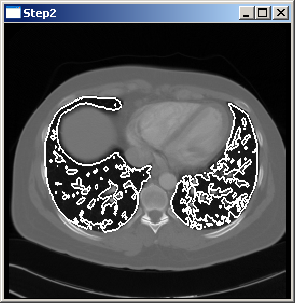
This program shows how to load multiple data sets. The picture above shows the result of the program when reading both the image file and the surface file. In order to obtain the result the program has to be executed using the image file Pic3D.nrrd and the surface file lungs.vtk.
The code for this example equals the code of Step 1 except for part II and part III which are changed as follows:
// Part II: Create some data by reading files
//*************************************************************************
int i;
for (i = 1; i < argc; ++i)
{
// For testing
if (strcmp(argv[i], "-testing") == 0)
continue;
//*********************************************************************
// Part III: Put the data into the datastorage
//*********************************************************************
// Add the node to the DataStorage
mitk::IOUtil::Load(argv[i], *storage);
static DataStorage::SetOfObjects::Pointer Load(const std::string &path, DataStorage &storage, const ReaderOptionsFunctorBase *optionsCallback=nullptr)
Load a file into the given DataStorage.
}